

HubSpot Breeze AI: What It Does and Where It Creates Value
HubSpot Breeze AI brings AI capabilities into everyday CRM activities, from preparing for sales conversations to drafting content, researching records and answering customer questions.
The opportunity is to reduce repetitive work and make better use of the information your business already holds. But Breeze is not a single tool, and different capabilities come with different requirements for configuration, oversight and ongoing management.
At Zippily, we start with a practical question: where is your team rebuilding context or repeating work, and what would a useful result look like? That gives AI adoption a clear purpose before you invest time configuring features.
What Is HubSpot Breeze AI?
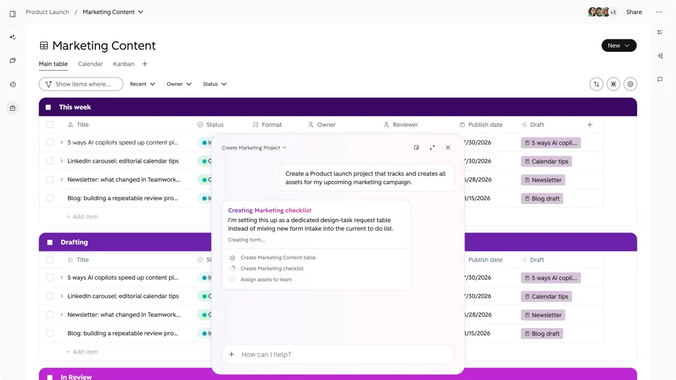
Breeze is HubSpot's collection of AI capabilities, including conversational assistance, specialized agents and AI features built into individual tools.
These capabilities can help turn available information into answers, drafts, research and actions. However, Breeze does not automatically have access to every conversation, document or external system your business uses. What it can do depends on the feature, available sources, permissions and account configuration.
HubSpot's AI adoption guidance highlights the importance of account settings, permissions, business context, documented knowledge and well-organized customer records. Some Breeze capabilities also consume HubSpot Credits, so usage and associated costs should form part of your planning.
Breeze Assistant vs Breeze Agents
The distinction between assistants and agents is important when deciding how to introduce AI into your business.
Capability
What it does
Example
Breeze Assistant
Helps people complete tasks through conversational prompts
Summarising a customer record or preparing a meeting brief
Breeze Agents
Carry out defined activities using their configured knowledge, instructions, tools and access
Answering customer questions or researching a CRM field
An assistant generally helps a person work through a request. An agent is configured to perform a more specific activity within defined boundaries.
That difference affects implementation. Generating an internal draft for review has different requirements from an agent responding directly to a customer or changing CRM records.
Before deploying an agent, establish what it can access, which actions it can take, when it should hand work to a person and how its performance will be monitored.
Five Practical Ways to Use Breeze AI
The best capability depends on the task you want to improve. These are five practical areas to consider.
1. Draft and Refine Marketing Content
Breeze Assistant can help your team generate and refine content using relevant business context and configured brand voice.
For example, a marketer could use approved product information and audience details to produce an initial email draft. They can then review the accuracy, tone, structure and call to action before publishing it.
The key is to provide a useful brief. AI can help create the content, but it should not be expected to decide your campaign strategy, understand every audience nuance or determine which message belongs at each stage of the customer journey.
This is where a clear marketing automation strategy still matters. Content generation works best when it supports a defined process rather than creating more material without a clear purpose.
2. Prepare for Meetings and Research Prospects
Breeze Assistant can summarise available CRM information to help sales representatives prepare for customer conversations.
Instead of searching through notes and logged activities individually, a representative can start with a summary and then review the underlying records to confirm the details that matter.
Prospecting Agent serves a different purpose. It can research and draft personalised outbound messages for selected contacts within its configured selling profile and sending controls.
Do not assume this means the agent independently finds every suitable prospect, detects all buying signals or manages replies. Its actual responsibilities depend on the configuration and workflow. For the prospecting setup described here, your team selects the recipients, connects a sender account and takes over when someone responds.
For both use cases, the quality of the output depends on the information available. Consistent activity logging and well-maintained company and contact records make the results more useful.
3. Answer Customer Questions with Customer Agent
Customer Agent can answer questions using connected knowledge sources such as help articles, website content and uploaded documents. Depending on its configuration, it can also perform supported actions and hand conversations to a person when needed.
Consider a customer trying to understand an onboarding step outside normal business hours. Customer Agent could provide an answer based on your approved documentation, while escalating a policy exception or an issue outside its scope to the support team.
The important part is testing both the answer and the handoff.
A response that sounds confident is not necessarily correct, and an answer that resolves a simple question does not prove that the agent can handle a complex exception. Test common questions, ambiguous requests and scenarios that should trigger escalation.
Your knowledge sources also need an owner. Outdated help content can produce outdated answers, so review unresolved conversations and recurring knowledge gaps rather than assuming the agent will automatically fix its own documentation.
4. Research CRM Records with Smart Properties
Smart Properties use Data Agent capabilities to populate CRM fields with AI-generated research based on a question and selected data sources.
For example, you might create a property that researches a company's website to identify the services it offers. Your team could then use the results to support segmentation, account preparation or record enrichment.
Depending on the feature and configuration, research may draw on sources such as websites, record information and logged engagements.
This is different from standard enrichment. Rather than simply filling a known field from a predefined data source, a Smart Property can investigate a question you specify.
The instructions need to be clear, and the results need to be tested. Start with a sample of records, compare the output against the original sources, and check how the field behaves when information is missing or ambiguous. Only enable broader or automated use once the results are sufficiently reliable.
5. Turn Business Context into More Useful Work
Across these capabilities, the common opportunity is helping people spend less time gathering information and more time applying it.
A sales representative might start a meeting with a clearer understanding of the account. A marketer might spend less time producing a first draft. A service team might resolve more routine questions using approved documentation.
These are potential benefits, not guaranteed outcomes. Whether they materialise depends on the process, the quality of the information and the amount of review required.
Where Does Breeze Create Business Value?
Enabling a feature is not the same as improving a business process. To understand whether Breeze is worthwhile, look at the work before and after introducing it.
Business area
Potential benefit
What to measure
Sales preparation
Less time gathering customer context
Preparation time and accuracy of summaries
Marketing
Faster first drafts and content refinement
Time to approved content, editing effort and factual corrections
Prospecting
More efficient preparation of personalised messages
Review time, relevance and response quality
Customer service
Better coverage for documented questions
Resolution quality, escalations and unresolved conversations
CRM research
Faster completion of selected fields
Research accuracy, completeness and correction rates
These measures help distinguish a genuinely useful improvement from a feature that produces output quickly but creates additional work elsewhere.
For example, if AI generates a draft in seconds but takes considerable time to correct, the net benefit may be small. Similarly, an agent that handles more conversations is not necessarily improving service if those conversations need to be reopened or escalated.
Where relevant, include HubSpot Credit usage in your assessment so you understand the cost of operating the capability at scale.
What Does Breeze Need to Work Effectively?
Breeze depends on the information, permissions and processes available to it. These foundations deserve attention before you expand AI usage.
Reliable CRM Data and Business Context
Important fields should have clear definitions, customer activity should be logged consistently, and product information should be current.
For content generation, provide an appropriate brief, audience context and approved brand guidance. For customer-facing agents, maintain accurate documentation and define which sources are authoritative.
A CRM audit can help identify data quality issues, configuration gaps and reporting limitations before you introduce AI into the affected processes.
The aim is not to make every record perfect before using Breeze. It is to understand which information the selected use case depends on and address the gaps that would materially affect its results.
Access Controls and Data Use
Configure access to AI features and relevant data deliberately. Account-level settings, individual permissions and feature-specific controls can affect what users and agents are able to access or do.
Review HubSpot's AI trust information alongside your own privacy and security requirements. HubSpot distinguishes between controls concerning the improvement of its models and contractual restrictions on third-party providers using customer data to train their models. Avoid treating these as a single, blanket statement about all data use.
Your business should understand which information a feature processes, which providers may be involved and what controls apply to your particular configuration.
Testing, Training and Ongoing Ownership
The level of oversight should match the potential consequences of the output.
An internal draft may need a straightforward review. Customer-facing responses, outbound communications and actions that change CRM records require more deliberate testing and controls.
Before launch, establish:
- Which tasks the capability is intended to perform.
- Which sources and permissions it needs.
- What acceptable output looks like.
- Which scenarios require human intervention.
- Who monitors quality and maintains the instructions, sources and configuration.
- How performance, review effort and usage costs will be measured.
Structured HubSpot training can help your team understand how the configured system works, what it is responsible for and when they should step in.
AI adoption is an ongoing operational responsibility, not simply a configuration task to complete at launch.
Where Should You Start with Breeze AI?
Start with one bounded use case where you can check the result.
Internal meeting preparation or first-draft content creation can be useful starting points because a person can review the output before relying on it. A customer-facing agent may offer greater operational benefits, but it also requires stronger knowledge management, testing and escalation processes.
A customer journey mapping workshop can help identify where information gaps, repetitive work or poor handovers create friction.
Use the following approach:
- Identify the task. Find a specific activity where your team repeatedly gathers information or completes predictable work.
- Define success. Decide what a useful result looks like and establish a baseline for time, quality or effort.
- Check the inputs. Confirm the required records, documents, integrations and permissions are available.
- Test on a small scale. Review representative examples, including missing information and unusual cases.
- Measure the outcome. Assess output quality, correction effort, escalations and HubSpot Credit usage where applicable.
- Expand deliberately. Increase usage when the results justify the additional operating effort and risk.
This approach gives you evidence to support decisions about which capabilities to adopt next.
Making Breeze Part of Your Operating Model
Breeze can help your team prepare for customer conversations, produce content, research CRM records and respond to routine questions. Its value comes from applying the right capability to a real business need, with the information and controls required to make the result dependable.
The work does not end at launch. CRM structures change, products evolve, documentation becomes outdated and teams develop new requirements. Someone needs to maintain the underlying data, integrations, automation and AI configuration.
Whether that responsibility sits with an internal administrator or is supported through an ongoing RevOps retainer, ongoing ownership helps keep the system aligned with how your business operates.
Start with a task worth improving, measure the result and build from what works.
FAQs About HubSpot Breeze AI
Does Breeze Replace a CRM Administrator?
No. Breeze can assist with selected tasks, but it still depends on configured records, permissions, integrations and processes. Your business needs someone responsible for data definitions, system access, integrations and ongoing decisions about how HubSpot should work.
Can Breeze Work with Information Outside HubSpot?
Some capabilities can use connected applications, uploaded documents or web research, depending on the feature and configuration. This does not mean every external file or application is automatically available to every assistant or agent. Check the supported sources and access requirements for the specific capability you plan to use.
Will Breeze Fix Incomplete Customer Records?
Breeze can support research and enrichment, but it cannot reliably recreate customer commitments or conversations that were never recorded. Start by identifying gaps in your data capture process, then test whether a particular AI feature can provide useful additional information.
Does Every Breeze Feature Have the Same Cost?
No. Availability and commercial requirements vary by feature, HubSpot product and subscription. Some capabilities consume HubSpot Credits. Check the current requirements for the specific feature and include expected usage in your cost assessment before expanding deployment.
Should We Start with an AI Agent?
Not necessarily. An assistant or internal drafting workflow may be a better first step if your team is still learning how to use AI effectively or your underlying data needs attention. Start with the task, assess the risks and choose the capability that fits the work rather than starting with the most autonomous option.

Written by
Sean Towson
Managing Director / Senior HubSpot Specialist