
HubSpot’s Customer Success Workspace is a dedicated area inside Service Hub Professional and Enterprise where account managers see every customer they own, each account’s health score, revenue, upcoming meetings and today’s tasks in one place. It takes the context that usually lives in an account manager’s head, inbox and calendar and puts it on a screen the whole team can see.
I’ve just moved the Zippily team onto it, and it’s one of those releases where you can tell HubSpot listened to what its customers kept asking for. Here’s what each tab does, where it earns its keep, what to decide before you switch it on, and who I think should use it.
What is the HubSpot Customer Success Workspace?
It’s a workspace built for account management, sitting alongside the help desk in Service Hub. Instead of jumping between company records, deals, tasks and your calendar, you get a single view of your book of clients ranked by health and commercial value.
To use it you need Service Hub Professional or Enterprise and an assigned Service Seat. Super admins without a Service Seat can open the workspace but only see the Summary tab. Professional gives you one workspace and Enterprise up to five, so larger businesses can run separate workspaces for different teams. Only users whose primary team is assigned to a workspace can see it.
What does each tab do?
- Summary: At-risk accounts, recent actions, today’s tasks, upcoming meetings and health score changes. Tells you where to spend your day.
- Customers: Every active client you own, with health score, last activity, key contacts and deal value. Replaces trawling through emails and notes for context.
- Projects: Onboarding, 30/60/90 day check-ins and renewal projects as task sets. Makes your post-sale process repeatable.
- Revenue: Associated deals by pipeline stage across your book. Shows recurring, project and ad hoc revenue in one snapshot.
- Actions: Alerts when health status changes, plus overdue and upcoming task views. Flags a slipping account before the client tells you.
- Schedule: Your meetings and tasks on a calendar. Meeting prep without digging through history.
- Dashboards: Shared reports for everyone with workspace access. One place for team-wide health reporting.
Summary: your helicopter view for the day
The Summary tab is the first thing you see each morning. It pulls together which accounts are at risk, recent actions, the meetings coming up, your tasks and any health score changes. Its job is to answer one question: what needs my attention today?
Customers: your whole client book on one screen
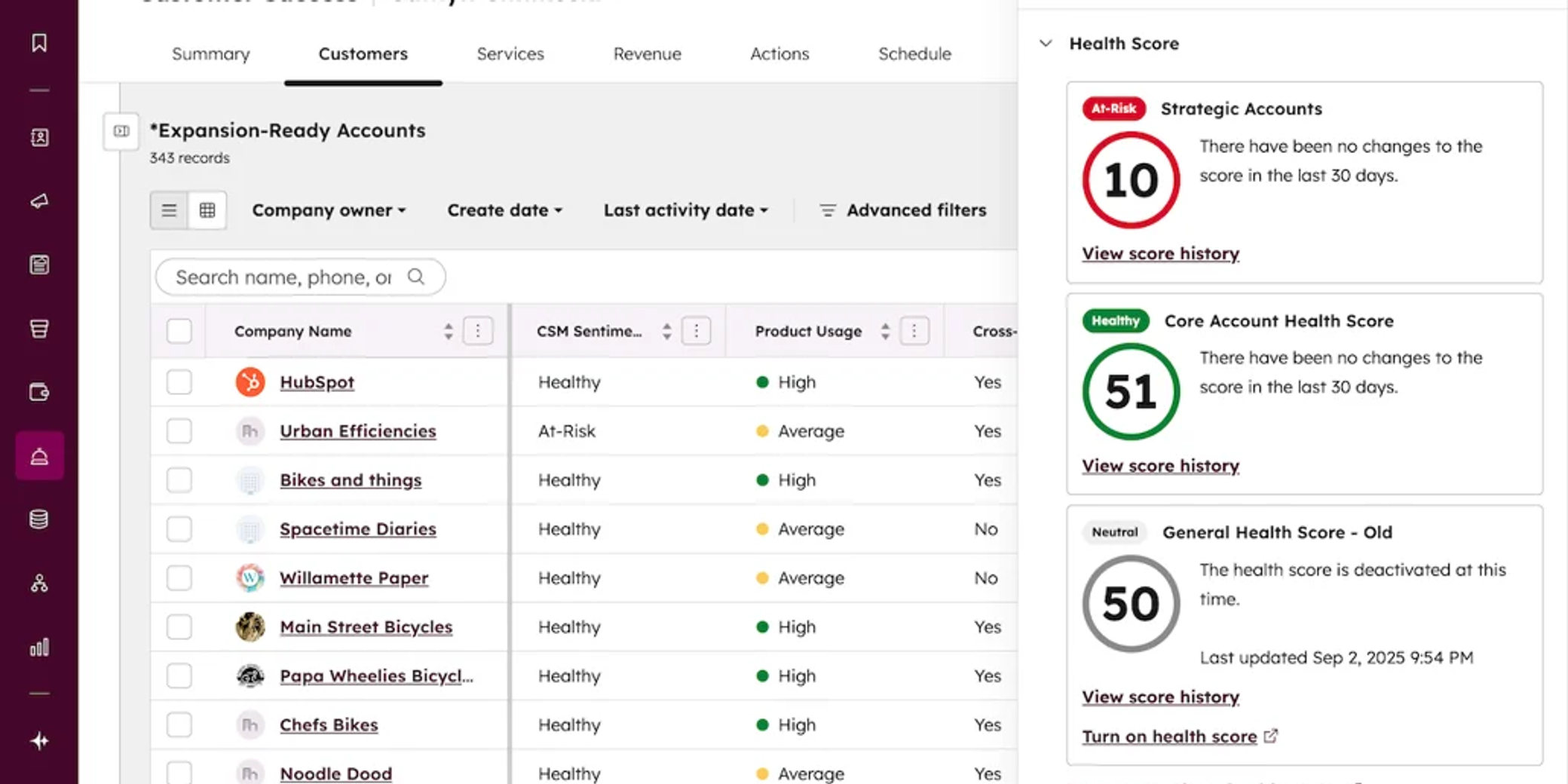
The Customers tab is a running list of the active clients you own. Out of the box you get each account’s health score and last activity date. We’ve added a manual health dropdown so account managers can record their own read on the relationship, key contacts on the account, a user property showing who from our team is delivering the work, and deal value.
That’s everything you’d want to know about an account at a glance, without side conversations, trawling email threads or booking a catch-up just to find context you missed. One tip: column changes you make on the fly reset when you refresh or navigate away, so set up the views you want to keep in the workspace settings.
Projects: onboarding and renewals as repeatable task sets
The Projects tab is where you trigger onboarding checklists, 30/60/90 day check-ins and renewal conversations. Each project is a series of tasks you customise around your own milestones, so every client gets the same standard of care no matter who owns the account. Which object powers this tab depends on when your HubSpot account was created, so check your options before you copy someone else’s setup.
Revenue: recurring, project and ad hoc revenue in one view
The Revenue tab shows the deal value associated with your client book, laid out by pipeline stage. Set up your pipelines well and you can see recurring retainers, project work and ad hoc revenue side by side, which makes renewal and upsell conversations far easier to prioritise. Keep delivery and revenue separate in your head too: a project can be running perfectly while the expansion deal next to it goes nowhere.
Actions: alerts when an account’s health shifts
The Actions tab is where health score alerts land. When an account moves from healthy to neutral or at-risk, you’re told, and you can work through overdue and upcoming tasks from the same view. If you want an AI layer on top, HubSpot’s Customer Health Agent (currently in beta, and it uses HubSpot credits) can review an account’s activity and call transcripts and suggest a retention plan.
Schedule: walk into every meeting prepared
The Schedule tab connects to your calendar and shows upcoming meetings and tasks by day, week or month. Pair it with HubSpot’s meeting notetaker and the summaries and transcripts from past meetings sit on the record, so preparing for a client call takes minutes rather than an hour of digging.
Dashboards: one source of truth for the team
You can add existing dashboards to the workspace, and everyone with workspace access can see them. This is where managers get the team-wide view of health, renewals and revenue. Be careful what you add: dashboards in the workspace are visible to every workspace user regardless of the dashboard’s own sharing settings, so keep leadership-only reporting out.
How does the customer health score work?
HubSpot’s health score is points-based. You choose the signals that matter to your business, such as one-to-one email and call engagement, support tickets, CSM sentiment and NPS, assign points to each, and set the thresholds that make an account healthy, neutral or at-risk. You can limit events to a timeframe, cap how many points a signal contributes, and let points decay over time, so an account that’s gone quiet drifts down the scale. Enterprise lets you run multiple health scores for different customer segments.
My advice is to start simple. Pick three or four signals you already trust, run it for a month, then adjust. A score nobody believes is worse than no score at all.
Before you turn it on, use the Test a company and Preview distribution options to check the score against accounts you already know well. If your most at-risk client shows up as healthy, something’s off. And treat missing activity as a data question before you treat it as a customer problem. A quiet account might be disengaged, or someone might not be logging calls. Product usage data won’t appear on its own either. If you want it in the score, you need to get it into HubSpot first.
What should you decide before you switch it on?
The workspace looks polished from day one, which is exactly why it’s easy to build on shaky foundations. Four decisions make the difference.
Who counts as a current customer?
You define your active customers using lifecycle stage or property filters. If clients keep the Customer lifecycle stage after they leave, lifecycle stage alone will fill your workspace with people you no longer work with. Decide how churned, paused and multi-product clients are handled.
Who owns the account after the sale?
The workspace uses a user property to assign each account to a CSM. If your sales rep stays as company owner, you’ll want a separate property for the account manager. An empty Customers tab is almost always an assignment problem, not a lack of customers. Our HubSpot Audit is a quick way to find these gaps.
What does your renewal date mean?
You set a renewal date property for customers, and the Revenue tab has its own date settings for deals. They don’t populate each other. If a client has several contracts, agree whether the account-level date is the next renewal conversation or something else, and write it down.
What happens when an alert fires?
This is the one most teams skip. An alert tells you an account has changed; it doesn’t tell anyone what to do. Decide who investigates, how quickly, and where the outcome gets logged. A customer journey mapping session is a good way to agree those handovers before you build anything.
Who should use the Customer Success Workspace?
When you’ve got five clients, it’s easy to keep health and priorities in your head. Beyond that, things get missed. We all know this.
If you manage several account managers and spend your week chasing them for churn risks and health updates, this is the feature for you. We recommend it most to agencies and SaaS businesses, where recurring revenue depends on clients staying happy and renewals arrive on a predictable cycle.
How we use it at Zippily
We love this tool. It’s one of the key configurations in our Post-Sales Excellence service, where we set up the health score, project templates, custom properties and dashboards so your team can use it from day one rather than switching it on and hoping for the best.
Our rule is simple: design the response before the score. If you don’t know what your team will do when an account turns red, a more sophisticated health score won’t help. Get the ownership and the next action right first, and the workspace becomes the place your team actually runs client relationships from.
Frequently asked questions
Which HubSpot plan includes the Customer Success Workspace?
The Customer Success Workspace is included in Service Hub Professional and Enterprise. Each user needs an assigned Service Seat to use every tab. It isn’t available on Free or Starter plans.
How many customer success workspaces can you have?
Service Hub Professional includes one workspace and Enterprise includes up to five. Each workspace is visible only to users whose primary team is assigned to it.
Is the HubSpot health score AI-generated?
No. The health score is rule-based: you choose the signals, assign points and set the thresholds. HubSpot’s separate Customer Health Agent, currently in beta, uses AI to assess account risk and uses HubSpot credits.
Can I customise the health score?
Yes. You choose which engagement, ticket, sentiment and NPS signals count, how many points each is worth, and where the healthy, neutral and at-risk thresholds sit. Enterprise accounts can run more than one health score.
Does the workspace include product usage data?
Not automatically. If you want product usage in your health score, that data needs to reach HubSpot through an integration and be associated with the right customer records first.
Can a small team use health scores?
Yes, as long as the data behind them is maintained and someone owns the response. A simple score with three or four trusted signals is more useful to a small team than a detailed model built on patchy data.
Do I need a HubSpot partner to set it up?
You can switch it on yourself. The value comes from defining your customers and account ownership, designing a health score your team trusts, building onboarding and renewal project templates, and connecting revenue pipelines properly, which is where a partner saves time.
Get it set up for your team
Want the Customer Success Workspace set up for your team? Let’s chat →

Written by
Sean Towson
Managing Director / Senior HubSpot Specialist