
Attio vs HubSpot: Which CRM Is Right for Your Business?
Attio and HubSpot are both strong CRM options, but they solve different problems.
Attio is best for teams that want a flexible, modern CRM they can shape around their sales process. HubSpot is better suited to businesses that want sales, marketing and customer service connected in one platform.
The decision comes down to how much of your customer journey you need your CRM to manage, what you're prepared to invest in implementation, and which capabilities your business actually needs.
At Zippily, we help businesses across New Zealand and Australia choose and implement the right CRM for their needs. Here's how Attio and HubSpot compare on pricing, AI, automation, setup and long-term scalability.
The short version: Attio vs HubSpot
- Choose Attio for flexibility: Its customisable data model, modern interface and built-in AI make it particularly appealing to startups, SaaS businesses and go-to-market teams.
- Choose HubSpot for an all-in-one platform: Sales, marketing and service tools work from a shared CRM database, with more extensive marketing automation and reporting capabilities.
- Compare total cost, not just licence fees: Attio may require separate marketing and support tools, while HubSpot's more advanced functionality can increase subscription and implementation costs.
- Attio is quicker to implement than HubSpot in many cases: However, its flexibility still requires thoughtful configuration, particularly for complex sales processes and integrations.
- Both offer useful AI capabilities: Attio focuses on CRM data and relationship management, while HubSpot's AI extends across sales, marketing and service.
- Think about local support: HubSpot has a more established partner ecosystem across New Zealand and Australia, while Attio's local implementation options are more limited.
Our recommendation: If you need a flexible sales CRM, start by evaluating Attio. If you need sophisticated marketing automation and a connected customer platform, HubSpot is likely to be the stronger fit.
How much does Attio cost compared to HubSpot?
The licence prices can be closer than you might expect. The bigger difference is what you get for your money and whether you'll need additional tools or implementation support.
Attio offers a free plan for up to three users, with paid plans for teams that need more advanced functionality. HubSpot also offers free tools and lower-cost Starter options, alongside more advanced paid tiers.
Illustrative year-one cost for five users
The following comparison uses the indicative pricing estimates in our original analysis. Treat these as budgeting figures rather than current quotes, and confirm pricing, currency conversions and subscription requirements before purchasing.
Year-one cost
Attio
HubSpot
CRM licences for five users
~$8,050 NZD
~$9,250 NZD
Email marketing
~$330 NZD for a separate tool
Free tools to start; paid Marketing Hub costs extra
One-off onboarding
$0
~$3,300 NZD equivalent
External implementation help
Optional; varies
Optional or subscription-dependent onboarding
Setup effort
Typically a few weeks for a considered setup
Weeks to months for a comprehensive implementation
Illustrative year-one total
~$8,400 plus external help
~$12,550 plus implementation
These estimates are not a like-for-like quote. They exclude some potentially relevant costs, and the actual total depends on the plans, seats, tools and implementation requirements you choose.
The important distinction is that Attio is primarily a CRM. If you need email marketing, customer support or other functionality, you'll generally need separate tools.
HubSpot can bring more of those capabilities together, but you may need paid subscriptions to access the features your business requires.
The best way to compare costs is to price the complete system you need to run your business, not just the CRM licences.
Attio vs HubSpot: How do their AI features compare?
Both platforms take AI seriously, but their strengths differ.
Attio: AI built around your CRM
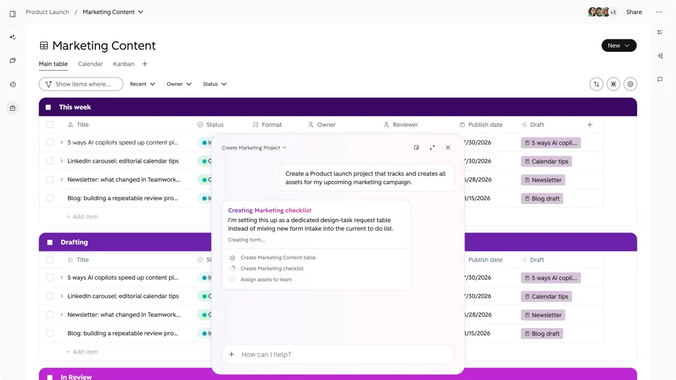
Attio's AI capabilities focus on making relationship management and CRM data more useful. Features such as Ask Attio let users query their CRM data in natural language, while its call intelligence and meeting notes help reduce manual work associated with sales conversations.
Combined with its flexible data model, this makes Attio appealing to revenue operations and go-to-market teams that want to build a CRM around the way they work.
HubSpot: AI across the customer journey
HubSpot's AI capabilities extend beyond the CRM itself, covering sales conversations, data management and deal progression, alongside other features available across its platform.
Feature
What it does
AI Notetaker
Records, transcribes and summarises supported meetings, identifies action items and helps draft follow-up emails
Smart properties
Uses AI to generate structured information for CRM properties
Deal Progression
Uses sales conversation context to suggest deal updates and next steps
Deal Plans
Helps sales teams coordinate a buyer's path to purchase, with AI-assisted updates through Deal Progression
Feature availability and subscription requirements can change. Check current HubSpot documentation before relying on specific plan inclusions.
At Zippily, we've found HubSpot's built-in Notetaker useful enough to replace our separate Fathom licence. That's a practical benefit for us, rather than another AI feature to experiment with.
The difference is breadth: Attio's AI is compelling for teams focused on CRM and relationships, while HubSpot offers more opportunities to connect AI-assisted activity across sales, marketing and customer service.
If you're exploring the latter, our guide, The HubSpot AI Features We Actually Use, covers the tools we've found most useful.
Which is easier to set up: Attio or HubSpot?
Attio is generally quicker to implement than HubSpot, but its flexibility still requires planning. HubSpot has a steeper learning curve because of its broader functionality and the number of decisions involved in configuring it properly.
Attio: Flexible, but not configuration-free
Attio's customisable data model lets you shape records, relationships and workflows around your business.
That flexibility is one of its biggest advantages, particularly for startups and SaaS businesses with sales processes that don't fit neatly into a standard CRM structure.
However, you'll still need to decide how your data should be organised, how your pipeline should work, which automations you need and how the platform should connect to your other tools.
For a considered implementation, allow time for configuration, testing and team training. Complex data migrations and custom integrations may require external expertise.
HubSpot: More to configure, more to coordinate
HubSpot has its own terminology, data structure and approach to managing customer relationships.
A good implementation needs to consider how contacts, companies and deals relate to one another, how leads are qualified, how teams share responsibility and which activities should trigger automation.
The added complexity can be worthwhile when you're implementing multiple hubs or building a more sophisticated customer journey. But if your requirements are relatively simple, you may not need all that functionality yet.
The goal isn't to configure the most features. It's to create a system that supports the way your team works and can evolve as your requirements change.
Does Attio have marketing automation?
Attio is primarily a CRM rather than an all-in-one marketing platform. It doesn't provide the same integrated marketing and customer service capabilities as HubSpot, so you'll generally need separate tools for those functions.
Attio does offer automation for CRM data and sales processes. However, if you want to run marketing campaigns, build email nurture sequences or manage more sophisticated marketing workflows, you'll need a dedicated marketing platform.
HubSpot brings these capabilities together with your sales pipeline and customer records. Depending on your subscription, you can capture leads, segment audiences, score leads, send targeted emails and trigger workflows based on customer behaviour.
For example, a business could automatically:
- Capture a prospect through a website form.
- Send relevant follow-up emails based on their interests.
- Notify the right sales representative when the prospect meets agreed qualification criteria.
- Create a deal once the prospect becomes a qualified opportunity.
- Report on how marketing activity contributes to sales.
These processes can use the same underlying CRM data, reducing the need to connect separate tools and reconcile information between systems.
Choose HubSpot if integrated marketing automation is a core requirement. If you mainly need to manage relationships and sales activity, Attio may be all you need.
Attio vs HubSpot for New Zealand and Australian businesses
Local implementation expertise and ongoing support can make a meaningful difference, particularly if your CRM is central to your business operations.
HubSpot has an established partner ecosystem across New Zealand and Australia, making it relatively straightforward to find local help with implementation, training, integrations and ongoing optimisation.
Attio's local partner and expert network is smaller. If you need hands-on implementation support, it's worth checking the availability and experience of providers before committing. Support response times and time-zone coverage are also worth considering.
For teams with straightforward requirements and the confidence to configure their own CRM, this may not be a deciding factor.
For businesses undertaking a complex implementation, migrating existing data or building custom integrations, access to experienced local support can reduce risk and make the transition easier.
As an Auckland-based CRM implementation partner, Zippily helps businesses across New Zealand and Australia assess their requirements and implement the platform that best fits their needs.
When should you choose Attio, and when should you choose HubSpot?
Use your business requirements, rather than team size alone, to guide the decision.
Choose Attio if you're...
Choose HubSpot if you're...
A startup or SaaS business with a sales process that needs customisation
A growing business investing in dedicated sales and marketing functions
A revenue operations or go-to-market team that values flexible data structures
Building connected marketing, sales and customer service processes
Looking for a modern CRM with built-in AI
Planning to invest in marketing automation and lead nurturing
Happy to use separate tools for marketing and customer support
Looking to consolidate more functionality into one platform
Comfortable investing time in designing your CRM structure
Looking for a broad ecosystem of integrations and implementation partners
One important caveat: a small business can still benefit from HubSpot if it has sophisticated marketing requirements, while a larger business may be perfectly happy with Attio if its needs are primarily sales-focused.
Start by identifying the processes your CRM needs to support. Then evaluate which platform can deliver them without unnecessary cost or complexity.
Our verdict: Attio or HubSpot?
Attio is an excellent choice for teams that want a flexible, modern CRM without committing to a comprehensive customer platform. Its data model, interface and AI capabilities make it particularly appealing to startups, SaaS businesses and teams with distinctive sales processes.
HubSpot is the stronger option when you need sales, marketing and customer service to work together. Its broader functionality can support more sophisticated customer journeys, automation and reporting, provided you're prepared to invest in the right setup.
Neither platform is universally better. The right choice is the one that fits your current requirements and gives you a sensible path forward as your business grows.
If you're comparing several platforms, our free Honest CRM Guide compares Folk, Brevo, Attio and HubSpot, including a decision path and year-one cost breakdown. If simplicity is your main priority, our Folk vs HubSpot comparison is another useful starting point.
Frequently asked questions
Is Attio better than HubSpot?
Attio is often a better fit for teams that need a flexible sales CRM and are happy to use separate marketing and support tools. HubSpot is generally better suited to businesses that want integrated sales, marketing and customer service, with more extensive automation and reporting.
Is Attio CRM free?
Attio offers a free plan with limits on users and functionality. Its paid plans provide additional capabilities. Check Attio's current pricing page for the latest plan limits and prices. HubSpot also offers free CRM tools, with paid subscriptions for more advanced features.
Does Attio have email marketing?
Attio isn't a full email marketing platform. Businesses that need newsletters, campaigns and automated nurture sequences will generally need a separate marketing tool. HubSpot offers integrated marketing functionality through its marketing products, with capabilities depending on the subscription.
Is Attio good for startups?
Yes. Attio can be a strong choice for startups that need a flexible CRM and want to adapt their data model as their business evolves. Startups that need integrated marketing automation and customer service from the outset may find HubSpot a better fit.
How long does it take to set up Attio?
A considered Attio implementation may take a few weeks, depending on the complexity of your data model, migration, integrations and automation requirements. Basic setup can be quicker, while more complex implementations may need additional technical support and training.
Can Attio replace HubSpot?
Attio can replace HubSpot for businesses whose main requirement is sales CRM functionality. However, it doesn't provide the same integrated marketing and customer service capabilities. Businesses migrating from HubSpot to Attio may need separate tools to replace the functionality they currently use.
Still not sure? Book a free 30-minute CRM fit call with Zippily. We'll ask a few questions about your business, help you understand the trade-offs and recommend the platform we think fits your needs, even if it isn't HubSpot.

Written by
Sean Towson
Managing Director / Senior HubSpot Specialist